

 Pokemon Card Scanner
 Live Wallpapers Unlimited




Master Your Chronograph: A Step-by-Step Guide on How to Set Chrono Watch in 2025
Introduction: Unlocking the Power of Your Chronograph
Welcome to the exciting world of chronographs! These sophisticated timepieces are more than just watches. They combine precise time-telling with a powerful stopwatch function. Many new owners wonder how to set chrono watch correctly. This guide will walk you through every step in 2025, ensuring your watch is always perfectly calibrated.
A chronograph is a true marvel of engineering. It allows you to measure elapsed time independently of the main time display. Whether you own a classic mechanical model or a modern digital version, understanding its functions is key. Let's dive into how to set chrono watch and master all its capabilities.
What Exactly is a Chronograph Watch?
At its core, a chronograph is a watch with a stopwatch built in. It features independent sweep seconds hands that can be started, stopped, and reset. This functionality makes it incredibly versatile for various tasks. You can time races, cooking, or even parking meters with precision.
Unlike a standard watch, which only tells time, a chronograph offers an additional layer of utility. It often includes multiple subdials for measuring seconds, minutes, and sometimes hours of elapsed time. This distinction is crucial when considering an analog watch vs chronograph watches for your wrist.
Analog vs. Digital Chronographs
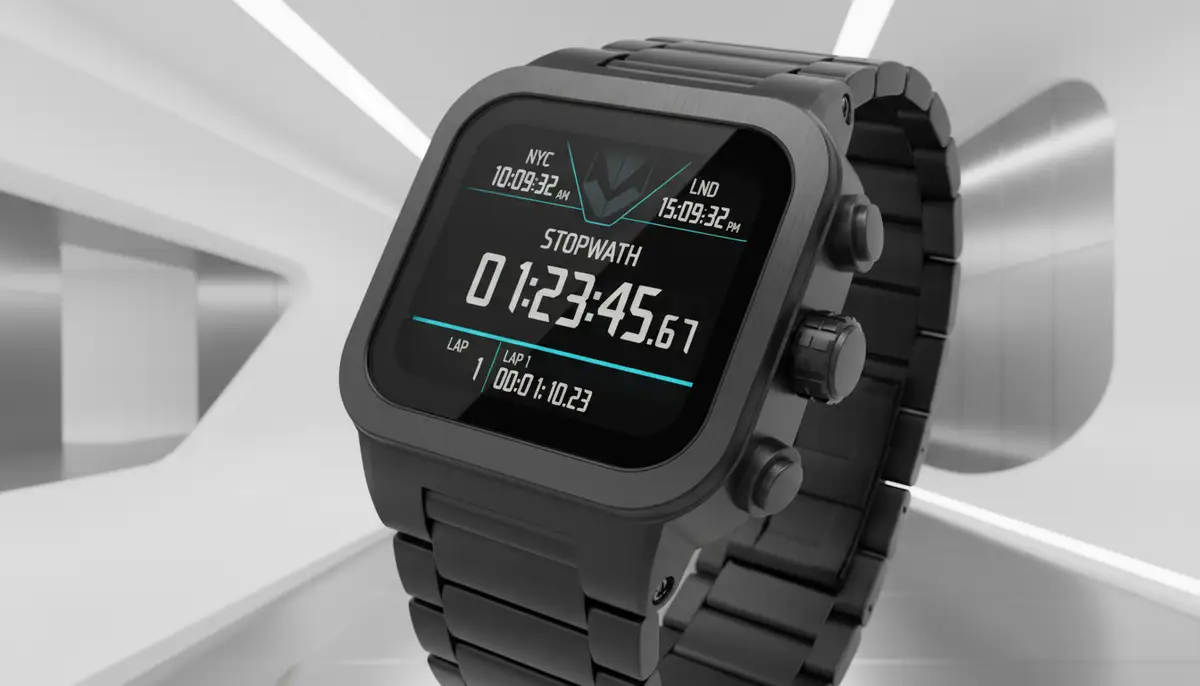
Chronographs come in two main types: analog and digital. Analog chronographs feature traditional hands and a mechanical or quartz movement. They offer a classic aesthetic and tactile experience. Digital chronographs, on the other hand, display time and stopwatch functions on an LCD or LED screen. They often include more features like alarms, multiple time zones, and countdown timers.
Both types require specific steps when you need to know how to set chrono watch. The principles are similar, but the exact buttons and crowns differ. We will cover both in detail to ensure you're fully equipped.
Essential Components of Your Chronograph
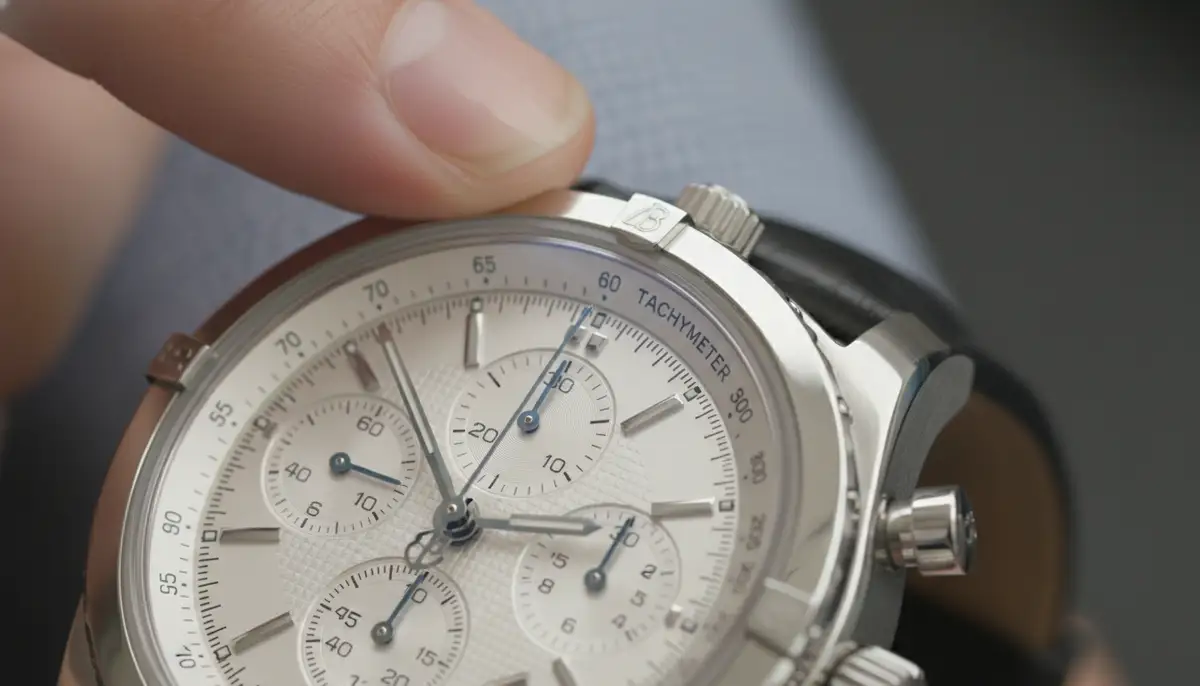
Before learning how to set chrono watch, it helps to know its parts. Understanding these components makes the setting process much clearer. Most chronographs, especially analog ones, share common elements.
- Crown: The knob on the side of the watch, primarily used for winding (mechanical watches) and setting the time and date.
- Pushers: Small buttons, usually above and below the crown, used to start, stop, and reset the chronograph (stopwatch) function.
- Subdials: Smaller dials on the main watch face that display elapsed seconds, minutes, or hours for the chronograph, or other complications like a 24-hour indicator.
- Main Hands: The hour, minute, and sometimes a regular running seconds hand for the primary time display.
- Chronograph Seconds Hand: A dedicated large second hand, often distinct from the main running seconds, used specifically for the stopwatch function.
Familiarize yourself with these parts. This knowledge is crucial for correctly understanding how to set chrono watch and use its features. Each component plays a vital role in its operation.
Before You Begin: Pre-Setting Checks
Always perform a few quick checks before you start. First, refer to your watch's instruction manual. While this guide provides general steps, specific models might have unique quirks. The manual offers the most accurate instructions for your particular timepiece. This is especially true for intricate luxury models.
Second, ensure your watch has enough power. For mechanical watches, wind it fully. For quartz watches, check the battery. A low battery can cause erratic behavior or prevent proper setting. A fully charged or wound watch responds best. Now you are ready to learn how to set chrono watch.
Step-by-Step Guide: How to Set Chrono Watch (Analog Models)
Analog chronographs are often mechanical or quartz-powered. They typically involve using the crown and pushers. Here’s a detailed breakdown of how to set chrono watch for these classic timepieces.
Setting the Time
Setting the main time is the first step. This ensures your watch always tells you the correct hour and minute. Follow these steps carefully:
- Unscrew/Pull the Crown: Many chronographs have a screw-down crown for water resistance. Gently unscrew it counter-clockwise until it pops out. If it's not screw-down, simply pull it out. You will feel distinct 'clicks' as you pull it to different positions. For time setting, you usually pull it to the outermost position (often position 2 or 3).
- Rotate to Set Time: Turn the crown clockwise or counter-clockwise to move the hour and minute hands. Set the time a few minutes ahead of the current time. This allows you to synchronize it precisely.
- Synchronize with a Reference Time: When the reference time (e.g., atomic clock, smartphone) reaches the exact minute you set, push the crown back in fully. If it's a screw-down crown, gently push it in and screw it clockwise until it's secure. This prevents water and dust from entering.
For more specific instructions on crown positions and their functions, you can find detailed instructions for chronograph watches from manufacturers. Always ensure the crown is fully pushed in or screwed down after setting. This maintains your watch’s water resistance.
Setting the Date (If Applicable)
Many chronographs also feature a date display. Setting the date correctly is important, especially for watches without perpetual calendars. This usually involves a different crown position.
- Pull Crown to Date-Setting Position: Gently pull the crown out to the first or second click position (often position 1 or 2, depending on the watch). This is usually one click less than the time-setting position.
- Rotate to Adjust Date: Turn the crown in one direction (usually clockwise) to advance the date. Some watches allow setting the day of the week in the opposite direction. Do not rotate the crown too quickly.
- Avoid the 'Danger Zone': For mechanical watches, avoid changing the date between 9 PM and 3 AM. During this period, the date-change mechanism is engaged, and manual adjustment can damage the movement. Set the time to 6:30 AM first, then set the date, and finally set the correct time.
- Push Crown Back: Once the date is correct, push the crown back in fully and secure it if it's screw-down.
This careful approach helps preserve the delicate internal mechanisms. Knowing how to set chrono watch includes mastering these date adjustments. It extends the life of your timepiece.
Calibrating the Chronograph Hands
Sometimes, after a battery change or a shock, the chronograph hands (the large sweep second hand and subdial hands) might not reset precisely to the 12 o'clock (or zero) position. This requires calibration. Here’s how to set chrono watch hands back to zero:
- Pull Crown to Time-Setting Position: Pull the crown out to the outermost position (time-setting position). This usually 'freezes' the main time hands and activates chronograph calibration mode.
- Use the Pushers to Adjust: Press the upper pusher (start/stop) to advance the chronograph seconds hand. Each press moves it by one increment. Press the lower pusher (reset) to adjust the minute or hour subdial hands, if they are also misaligned. You might need to press and hold the pushers on some models.
- Align to Zero: Continue pressing until all chronograph hands (main sweep second, minute subdial, hour subdial) are perfectly aligned at their 12 o'clock or zero markers. Precision is key here.
- Push Crown Back In: Once aligned, push the crown back in fully. The chronograph hands should now reset to zero correctly when you use the reset pusher.
This calibration ensures your stopwatch functions accurately. For a visual guide on this process, especially for luxury models, you can watch this helpful video:
. It provides excellent demonstrations. Additionally, for how to set a Swiss made chronograph watch, you'll find similar detailed instructions on fine-tuning.How to Set Chrono Watch (Digital Models)
Digital chronographs operate differently from their analog counterparts. They use buttons instead of a crown for most adjustments. Here’s a general guide on how to set chrono watch for digital models.
- Press the 'Mode' Button: Most digital watches have a 'Mode' button. Press it repeatedly until the time display starts flashing, or you enter the time-setting mode. This button cycles through various functions like time, alarm, stopwatch, and timer.
- Use 'Adjust' or 'Set' Button: Once the time is flashing, use another button, often labeled 'Adjust,' 'Set,' or 'Start/Stop,' to change the flashing digit. This button increments the hours, minutes, or seconds.
- Cycle Through Digits: You'll typically press the 'Mode' button again to move to the next digit (e.g., from hours to minutes, then to seconds). Adjust each segment as needed.
- Confirm Settings: Once all digits are correct, press the 'Mode' or 'Set' button one last time to exit the setting mode. The display should stop flashing.
Digital watches often offer more features like 12/24-hour format, date, day of the week, and even year settings. You'll typically cycle through these using the 'Mode' button and adjust them with the 'Adjust' button. For more comprehensive instructions, a guide on how to set a digital watch can be very useful, as many principles apply to digital chronographs.
Mastering Chronograph Functions: Beyond Basic Time-Telling
Now that you know how to set chrono watch, let's explore its full potential. The chronograph function itself is incredibly versatile. It offers more than just simple time measurement. Understanding these features enhances your watch experience.
Using the Stopwatch (Chronograph) Feature
The stopwatch is the heart of your chronograph. It's designed for precise timing. Here’s how it typically works:
- Start: Press the upper pusher (often at 2 o'clock). The large chronograph seconds hand will start moving, along with any minute or hour subdials.
- Stop: Press the upper pusher again to stop the timing. The hands will freeze, showing the elapsed time.
- Read: Read the elapsed time from the chronograph seconds hand and the subdial hands.
- Reset: Press the lower pusher (often at 4 o'clock) to reset all chronograph hands back to their zero positions. You can often reset even if the chronograph is running, which is called a 'flyback' function on some advanced models.
Some chronographs also feature a 'split-time' or 'lap-time' function. This allows you to measure intermediate times without stopping the main timing. You press the lower pusher to 'split' the time, then again to catch up. This is a very useful feature for sports or complex timing tasks. Knowing how to set chrono watch and use its stopwatch effectively makes it a powerful tool.
| Pusher Action | Chronograph Function |
|---|---|
| Upper Pusher (First Press) | Starts the Chronograph/Stopwatch |
| Upper Pusher (Second Press) | Stops the Chronograph/Stopwatch |
| Lower Pusher (While Stopped) | Resets Chronograph Hands to Zero |
| Lower Pusher (While Running - Split Time) | Measures Intermediate Time (Split) / Catches Up (Lap) |
Tachymeter Scale (If Present)
Many analog chronographs feature a tachymeter scale on their bezel or outer dial. This scale helps you measure speed over a known distance. For example, if you time how long it takes to travel one kilometer or mile. You start the chronograph at the beginning of the distance and stop it at the end. The chronograph seconds hand will then point to a number on the tachymeter scale, indicating your average speed in units per hour.
This is a classic feature, especially popular in racing watches. It adds to the functionality beyond simply knowing how to set chrono watch. It turns your watch into a practical instrument for specific calculations.
Other Complications
Some chronographs come with additional 'complications.' These are extra functions beyond basic time-telling. Examples include moon phase indicators, GMT (Greenwich Mean Time) or dual time zone displays, and annual calendars. Each complication requires its own specific setting procedure, often involving additional pushers or crown positions. Always consult your manual for these advanced features.
Troubleshooting Common Chronograph Setting Issues
Even with careful attention to how to set chrono watch, you might encounter issues. Don't worry, many common problems have simple solutions. Here are a few typical scenarios and how to address them.
Hands Not Aligning to Zero
This is a very common issue, especially after a watch has been dropped or had its battery changed. If your chronograph seconds hand or subdial hands don't reset precisely to 12 o'clock or zero, they need recalibration. Refer back to the 'Calibrating the Chronograph Hands' section. Pull the crown to the time-setting position and use the pushers to manually adjust each hand back to its correct home position. This usually fixes the problem quickly.
Date Not Changing Correctly
If your date display isn't advancing at midnight, or if it's stuck, check two things. First, ensure you've set the time correctly for AM/PM. The watch thinks it's noon when it's midnight, or vice-versa. Second, remember the 'danger zone' for mechanical watches (9 PM to 3 AM). If you tried to set the date during this period, you might have temporarily jammed the mechanism. Try setting the time outside this zone, then adjust the date. If the issue persists, a professional watchmaker might need to inspect it.
Watch Not Responding to Settings
If your watch doesn't respond when you try to set the time or date, check the crown. Is it pulled out to the correct position? For screw-down crowns, is it fully unscrewed and pulled out? For quartz watches, a dead or low battery is often the culprit. Replace the battery if necessary. For mechanical watches, ensure it's fully wound. If none of these solutions work, there might be an internal issue requiring professional service. Knowing how to set chrono watch also means knowing when to seek expert help.
Maintaining Your Chronograph Watch for Longevity
Proper maintenance extends the life and accuracy of your chronograph. Regular cleaning, careful handling, and periodic servicing are crucial. Wipe your watch with a soft, dry cloth regularly to remove dust and fingerprints. Avoid exposing it to extreme temperatures or strong magnetic fields, which can affect its accuracy. Always ensure the crown is pushed in or screwed down, especially before contact with water.
For mechanical chronographs, a service every 3-5 years is recommended. This involves cleaning, oiling, and adjusting the movement. Think of it like a tune-up for a high-performance engine. This proactive approach prevents major issues and keeps your watch running smoothly for decades. This is an important part of truly understanding how to set chrono watch and keep it in top condition.
Customizing Your Chronograph Experience
Beyond the physical watch, modern technology offers new ways to personalize your timekeeping. If you own a smartwatch with chronograph capabilities, like an Apple Watch or a Wear OS device, you can completely transform its look and feel. Platforms like WatchMaker provide thousands of download watch faces to suit any style or mood. This allows you to customize your digital chronograph display with unique designs and layouts.
You can find watch faces that mimic classic analog chronographs or embrace futuristic digital designs. This level of customization is a significant advantage of smartwatches. Whether you're comparing a 42mm vs 46mm Apple Watch or a Wear OS device, the ability to change watch faces lets you tailor your device to perfectly match your personal style and functional needs. This modern approach complements the traditional art of knowing how to set chrono watch.
While WatchMaker offers an extensive repository, other platforms also provide excellent options. Companies like buddywatch.app, amoledwatchfaces.com, and watchfacely.com also contribute to the vibrant ecosystem of digital watch face customization. These alternatives highlight the growing demand for personalized smartwatch experiences. However, WatchMaker prides itself on its vast selection and active community, offering unparalleled choice for users who want to truly make their digital chronograph their own.
Conclusion: Your Chronograph, Mastered
Congratulations! You've now gained a comprehensive understanding of how to set chrono watch, whether it's an elegant analog piece or a feature-rich digital model. From setting the basic time and date to calibrating the chronograph hands and utilizing advanced functions, you are well-equipped. This knowledge empowers you to get the most out of your sophisticated timepiece.
Remember to always consult your specific watch's manual for unique instructions. Practice makes perfect, so don't hesitate to experiment with the functions. Your chronograph is a blend of artistry and engineering. By knowing how to set chrono watch and maintain it, you ensure it remains a reliable and cherished companion for years to come. Enjoy the precision and versatility it brings to your daily life!
Related Posts

The Watch Face Mistake Almost Every New Garmin Owner Makes
There's a predictable arc to owning a new Garmin. Day one, you install a watch face that shows everything: heart rate, steps, battery, weather, two time zones,...

The Ultimate Apple Watch Strap Guide: Find Your Perfect Fit & Style in 2025
Introduction: Your Essential Apple Watch Strap Guide for 2025 Your Apple Watch is more than just a gadget. It's a personal statement, a fitness tracker, and a...