
 Pokemon Card Scanner
 Themeology




Yellow Chrono Bike

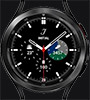
The primary central hands: Large white hands (skeleton hands) – these are the watch's standard hour hand (the short one) and minute hand (the long one), indicating the current time of day. Thin red hand – this is the stopwatch second hand (chronograph). It remains stationary at the 12 o'clock position until you start the stopwatch using the top button on the side of the watch. The three small dials (sub-dials): Top dial (12 o'clock) – displays stopwatch minutes; when the stopwatch is running, this dial counts up to 60 minutes. Left dial (9 o'clock) – this is a 24-hour indicator (marked "HR"); it tracks the main hands and shows whether the time is in the morning or afternoon/night (e.g., distinguishing between 06:00 and 18:00). Bottom dial (6 o'clock) – this is the watch's standard second hand; it ticks continuously to show the watch is running, regardless of whether the stopwatch is activated. Additionally, there is a date display located in the yellow square at the 3 o'clock position, showing the current day of the month. Do you need help figuring out how to start, stop, and reset the stopwatch hands, or does one of the hands need to be calibrated back to its correct position?
Créé le 4 Aug 2026