




 Pokemon Card Scanner
 Live Wallpapers Unlimited
HummingBird Series1 110225

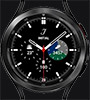
This watch face is only tested on Galaxy Watch 6 classic.
Shows moon phase and when next full moon, both in date and how many days left. This is only approximately.
-Tap Clock to alternate between Local time and 3 different time zones, that you have pre selected in your WatchMaker app. For the complication, Ive used "next alarm".
-Tap Chrono to enter stopwatch mode, and tap "Start" and "Stop" to start and stop the stopwatch. Tap "Reset" to reset. Tap Lap for lap times.
-Tap Weather to enter weather mode. It updates the weather when you enter weather mode. Tap Weather again to alternate between Celsius and Fahrenheit. You can force a new update by tapping "Last Upd" display.
-Tap Health to enter Health mode with step counter, distance and heart rate.
-Tap center of watch face when in Clock mode to open a calendar for present month.
-Tap logo at the bottom to change color.
Created 11 Feb 2025