

 Pokemon Card Scanner
 Live Wallpapers Unlimited



-16.23- accents No. 2 - world traveler - designed by Ron D. 2023
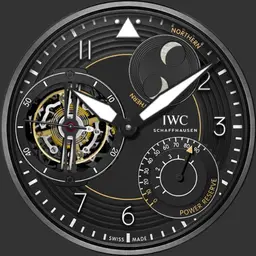
Tap 6 = double tap to unlock Tap functions / single tap to lock Tap functions.
Tap center for zoom, twice for extra zoom.
Tap top to set/reset time mark bezel.
Tap 2 = turns off time zone info
Tap 3 = adjust face brightness
Tap 7 = turns on battery hand
Tap 8 = turns on Parallax efect
Tap 9 = move hands for chrono
Tap 10 = change to digital face, always unlockt.
Tap 12 = DIM mode off / on / sunset on / auto
Tap upper sub dial to Start/Stop Chronograph, double Tap for Reset.
-ucolor for DIM
Digital Face
-------------------
Tap Weather Symbol for update
Tap plus or minus to set Time Zones
-24h hand is automatically synchronized in the main face-
Tap TZ names to zoom card
Tap Compass Pos. E Bezel turns towards east
Tap Compass Pos. W Bezel turns towards west
Tap Center for real Compass function
Tap Summertime for toggle ST-NT
-Moon run at the edge
An angle of 0 means a new moon, 90 degrees means the first quarter, 180 means a full moon, and 270 degrees means the last quarter.
Erstellt am 3 Apr 2023